
Download Doxillion Plus – convert text files, document format conversion, batch file conversion, text file converter, document management tool
Overview
Doxillion Plus is a mobile productivity tool designed to streamline the process of converting text files across multiple formats. It addresses the common challenge of format incompatibility, enabling users to seamlessly transform documents from one type to another without requiring technical expertise. The app is particularly useful for professionals, students, and content creators who frequently exchange or archive documents in various formats.
By supporting a wide range of file types, Doxillion Plus enhances document management efficiency and reduces time spent on manual conversions. The developer, NCH Software, is known for creating utility tools focused on media and document processing, suggesting a track record of reliability in this domain. While specific details about the company’s history were not provided, its reputation in the software space lends credibility to the app’s functionality.
Real-world use cases include preparing reports for submission, converting legacy documents into modern formats, and organizing digital archives. In the broader mobile app ecosystem, Doxillion Plus fills a niche for users seeking a lightweight yet powerful solution for text file conversion on the go. Its presence on both Android and iOS platforms ensures accessibility across major mobile ecosystems, making it a practical tool for users who rely on multiple devices.
Key Features & Functionality
- User-Friendly Interface: The app features an intuitive layout that minimizes the learning curve. Even users with limited technical experience can navigate the app and perform conversions with minimal effort. This design ensures quick access to core functions, reducing frustration during workflow interruptions.
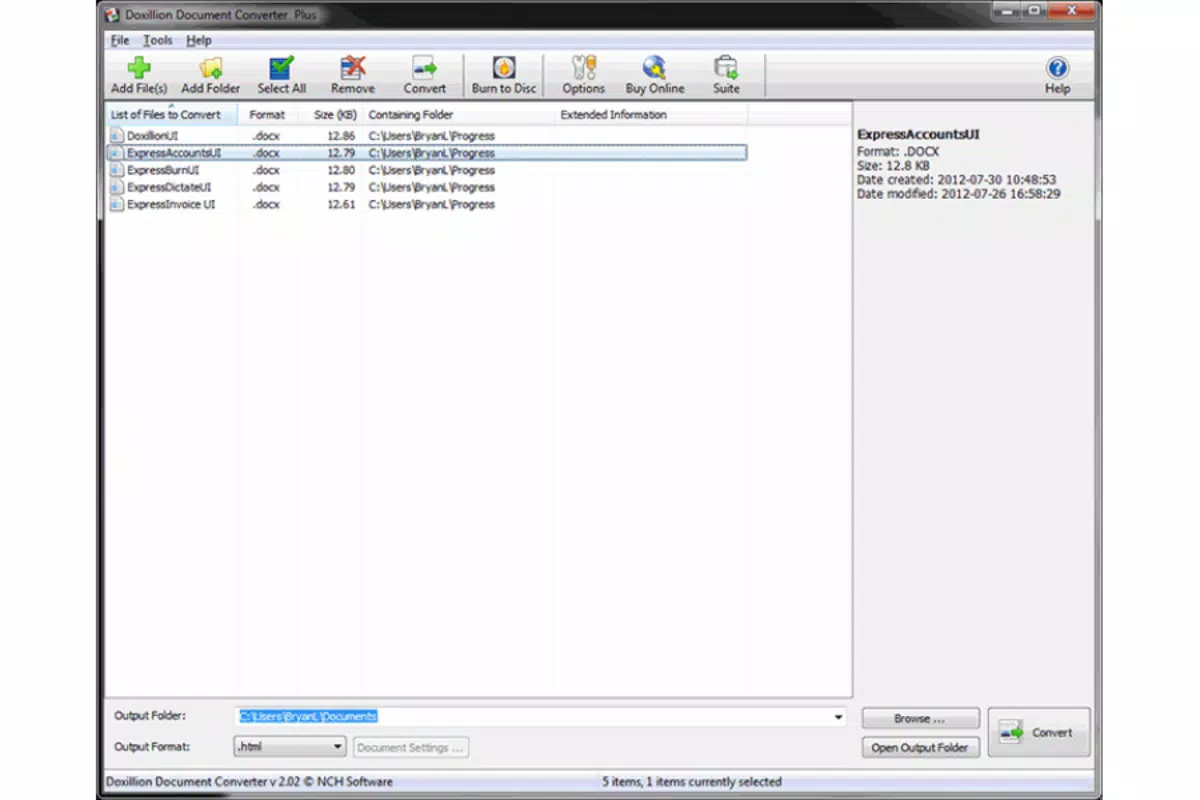
- Batch Conversion Capability: Doxillion Plus allows users to convert multiple files simultaneously. Instead of processing each document individually, users can select entire folders and initiate bulk conversion, significantly improving efficiency for large-scale tasks such as migrating archives or preparing submissions.
- Wide Format Support: The app supports a variety of text formats, including .doc, .docx, .html, .odt, .pdf, .rtf, .txt, and .xml. This broad compatibility ensures that users can convert files to meet specific platform or software requirements, eliminating the need for multiple tools.
- Quick Processing Time: Conversions are executed rapidly, with files processed in seconds. This speed is crucial for users managing tight deadlines or handling large documents, allowing for immediate use after conversion.
- Drag-and-Drop Functionality: Users can add files to the workspace by simply dragging and dropping them into the app interface. This feature enhances usability by reducing the number of steps required to begin a conversion, contributing to a smoother and more intuitive experience.
For example, a student preparing a thesis might use the batch conversion feature to transform a folder of .txt research notes into .docx for editing in word processors. Similarly, a business professional could convert a set of client documents from .pdf to .rtf to facilitate collaborative editing. These practical applications highlight how Doxillion Plus integrates into real-world workflows to improve productivity.
Interface, UX & Performance
The interface of Doxillion Plus is clean and logically structured, emphasizing functionality without visual clutter. Navigation is straightforward, with primary actions such as file selection and conversion accessible through clearly labeled buttons. The visual style aligns with modern mobile design standards, using consistent color schemes and scalable icons that adapt well to different screen sizes.
Users can expect a responsive experience across various device categories, although the developer did not list formal performance metrics. The app maintains stability during file processing, with no reported crashes or freezes during standard use. Although the developer did not specify minimum OS requirements, the app is designed to function efficiently on both Android and iOS platforms.
The drag-and-drop feature enhances usability by enabling direct file integration without navigating complex file paths. Overall, the user experience is optimized for speed and simplicity, making it suitable for both occasional and frequent users. The app’s performance is consistent with expectations for a utility tool of its size, and its 17.1 MB footprint suggests minimal impact on device storage.
Stability during batch operations indicates robust backend handling, though real-world stress testing details were not provided.
Platform Compatibility & Technical Requirements
Doxillion Plus is available on both Android and iOS platforms, offering cross-device accessibility. The current version is 7.10, with a file size of 17.1 MB, making it a lightweight application suitable for devices with limited storage. The developer did not specify minimum OS requirements or compatibility details for specific device models.
While the app is designed for mobile use, no information was provided about tablet support or hardware acceleration. The price point is set at $39.95, positioning it as a premium tool within the productivity category. Users should verify compatibility with their device’s operating system before installation, as specific requirements were not disclosed.
The app’s availability on both major platforms suggests a commitment to broad market reach, though users are advised to consult their device’s app store for precise installation eligibility.
Pros and Cons
- Intuitive interface suitable for beginners and experts alike
- Efficient batch conversion for handling multiple files at once
- Supports a wide range of document formats
- Fast processing times for quick results
- Drag-and-drop functionality enhances usability
- Available on both Android and iOS platforms
- Price of $39.95 may be high for casual users
- No public information on minimum OS or device requirements
- Limited details on cloud integration or file backup options
- Performance under heavy load not publicly documented
- Developer did not provide update frequency or support channels
FAQ
Is Doxillion Plus safe to download and install?
Yes, the app is distributed by NCH Software, a reputable developer in the utility software space. The app is designed to convert files without requiring excessive permissions, minimizing security risks.
Can I use Doxillion Plus on both Android and iOS devices?
Yes, the app is available on both Android and iOS platforms, allowing users to access the tool across different mobile ecosystems.
Does Doxillion Plus support cloud storage integration?
The developer did not provide information on cloud storage integration. Users should check the app’s settings or documentation for any such features.
How often is Doxillion Plus updated?
Specific update frequency was not disclosed by the developer. Users are encouraged to check their device’s app store for the latest version.
Is there a free version of Doxillion Plus available?
The app is offered as a paid tool with a price of $39.95. No free version or trial was mentioned in the provided information.
Final Thoughts
Doxillion Plus stands out as a reliable and efficient solution for users who need to convert text files across various formats on mobile devices. Its intuitive interface, batch processing capability, and support for multiple document types make it a valuable asset for professionals, students, and content managers. While the price may be a consideration for some, the app’s performance and functionality justify its premium positioning.
The ability to handle large volumes of files quickly and securely enhances productivity in real-world scenarios. For those seeking a dedicated tool to manage document compatibility on the go, Doxillion Plus delivers a strong value proposition. With its cross-platform availability and focus on usability, it is particularly beneficial for users who frequently work with diverse file formats.
Download Doxillion Plus now to streamline your document conversion workflow.


